DRIVELAB TELEM 2.1 • TRACKLAB + RACELINK

Record any road.
Race your friends live.

Open a private RaceLink lobby first, share the room code, and let friends join and chat. The host can then choose a TrackLab course, save the race setup, collect everyone’s Ready status, and launch one synchronized start.

Free Edition works immediately and includes a 60-second TrackLab timing trial. No account, serial key, game mod, or PC helper required.

DriveLab Telem 2 dashboards, TrackLab timing, race data, achievements, and Drift Lab
Local UDP telemetry
No PC helperDirect BeamNG UDP connection
New in 2.2.1
Auto Co-Driver
Uses built-in protocols
Solo data stays localRaceLink is separate and opt-in
In-app multiplayerFriends, invites, chat, and standings

CURRENT RELEASE

Always download the production build.

The permanent link below follows the same production release used by DriveLab's signed in-app update system.

STABLE Checking signed release feed…
DriveLab Telem
APK
Loading…
Size
Published
SHA-256
21 downloads Checking RaceLink -- ms

VERIFIED PRODUCTION APK

0 malicious • 0 suspicious VirusTotal 74 engine results • exact signed build 37 APK

DriveLab Telem 2.4.0 (37) • scanned July 24, 2026 • SHA-256 598ecb27ace5…0e7b525765f0

No participating VirusTotal engine flagged this exact APK at the recorded scan time. Malware scans are point-in-time checks and cannot guarantee absolute safety. Install only from official DriveLab sources.

DRIVELAB TELEM 2 • HEADLINE FEATURE

Turn almost any BeamNG road into a timed course.

Record the route once, arm it, cross the start, and TrackLab handles timing while showing your position, sectors, live delta, and best-run ghost.

01

Course Recorder

Create circuits or point-to-point stages directly from stock MotionSim position data.

02

Automatic Timing

Start, finish, route progress, sectors, lap history, and best-run tracking happen automatically.

03

Race Your Best

Full Edition adds live delta, optimal lap analysis, and a brighter high-visibility ghost marker.

04

New in 2.2.1
Auto Co-Driver

Generate spoken pace notes directly from a recorded TrackLab course. DriveLab detects corners, braking zones, crests, jumps, big jumps, quick dips, and the finish, with adjustable call timing, detail, and voice speed.

FREE TRACKLAB

Try the complete idea first.

  • One saved course
  • 60 active timing seconds per app session
  • Automatic start and finish detection
  • Live course position
Try TrackLab Free

FULL TRACKLAB

Unlimited timing and analysis.

  • Unlimited TrackLab timing
  • Live delta and high-visibility ghost
  • Sectors and optimal-lap calculation
  • Expanded course and lap history
Unlock Full Edition
TRACKLAB COURSE Industrial Loop
LIVE RUN
Your carCurrent position Best-lap ghostWhere your fastest lap was
TIME THIS LAP 0:42.381 Timer is still running
YOUR BEST LAP 0:41.927 Fastest completed lap
COMPARED WITH BEST 0.184 sec faster You are currently ahead
CURRENT PROGRESSSector 2 of 3
About two-thirds through the lap
Sector 10.122 sec fasterthan your best lap
Sector 2In progresstiming live now
Best possible lap0:41.203using your fastest sectors

WHAT IT DOES

More than a speedometer.

DriveLab keeps telemetry off the game screen and adds tools that make normal driving, racing, testing, and long-term progression more interesting.

01

Live Dashboard

Speed, RPM, gear, fuel, temperatures, forces, inputs, motion, and vehicle data in real time.

02

Digital Cockpit

A focused instrument cluster designed for a phone mounted beside a wheel or monitor.

03

TrackLab

Record circuits, roads, hill climbs, rally stages, and point-to-point courses with automatic timing, sectors, ghost comparison, saved laps, and a contained live course map. Numbered Auto Co-Driver callouts now appear directly on the map with matching pace-note review numbers.

04

RaceLink

Open a lobby first, invite friends by visible DL code, configure the course, collect Ready states, and launch synchronized races.

05

Race Labs

Drift analysis, acceleration testing, brake testing, dynamics, records, and driver coaching tools.

06

Analyze & History

Saved sessions, graphs, crash records, drive history, automatic tracking, and performance review.

07

Progression

Driver XP, levels, achievements, and long-term goals that make every session count.

08

Custom Layouts

Full Edition dashboard editing and customization for the information that matters to you.

09

Stunt Detection

Live recognition for donuts, burnouts, J-turns, reverse 180s, drift transitions, jumps, flips, two-wheel driving, wheelies, stoppies, hard landings, and major recoveries.

10

Driver DNA

An optional private driving profile that develops gradually across twelve traits. Driver DNA starts disabled and stays out of the normal app until enabled.

11

Drive Stories

Completed sessions become readable stories with major moments, detected maneuvers, important statistics, and clean share cards generated locally on the phone.
FREE OR FULL

Start free. Unlock the complete system when it earns the spot.

FREE EDITION

Live telemetry without friction.

$0 no account required

  • Basic Live telemetry
  • TrackLab: one course and 60-second timing trial
  • BeamNG connection setup
  • App settings
  • Secure signed updates
  • Full interface preview through Demo Mode
Download Free

FULL EDITION

The complete DriveLab experience.

One license supports up to two active Android devices

  • TrackLab unlimited timing, ghost, delta, sectors, and optimal lap
  • RaceLink friend codes, lobby-first rooms, invites, chat, Ready checks, live standings, and results
  • Digital Cockpit and Race Labs
  • Analyze, graphs, records, and coaching
  • Automatic drive tracking
  • Saved sessions and crash history
  • XP, levels, and achievements
  • Dashboard layout customization
Get Full Edition

Demo Mode previews Full Edition screens but does not permanently save progression, sessions, or crash history.

LIVE SERVICE STATUS

DriveLab and RaceLink status.

Live checks published by the DriveLab server. Response time is measured directly between DriveLab and the RaceLink API.

RaceLink server CHECKING
-- ms Measuring public API response
DriveLab API CHECKING
Connecting Licensing, updates and public service data
Website CHECKING
Connecting Public download and product website
APK downloads LIVE
21 Website download actions since the seeded launch total

FULL PRODUCT SHOWCASE

See DriveLab in action.

Watch the complete 65-second tour of live telemetry, cockpit gauges, TrackLab course tools, RaceLink rooms, progression, analytics and setup.

Live telemetry TrackLab RaceLink Achievements

1:05 vertical showcase • Sound available • Plays directly in your browser

REAL APP SCREENS

See the interface before installing.

DriveLab live dashboard
Live Dashboard
DriveLab digital cockpit
Digital Cockpit
DriveLab Drift Lab
Drift Lab
DriveLab achievements
Achievements
DriveLab driver progression
Driver Progression
DriveLab drag and brake testing
Drag & Brake
DriveLab vehicle dynamics
Vehicle Dynamics
DriveLab guided setup and demo
Setup & Demo
DriveLab Telem large visible RaceLink friend code
RaceLink Friend Code
DriveLab Telem create or join RaceLink room
Create or Join
DriveLab Telem built-in RaceLink lobby chat
Lobby Chat
DriveLab Telem RaceLink drivers and Ready states
Drivers Ready
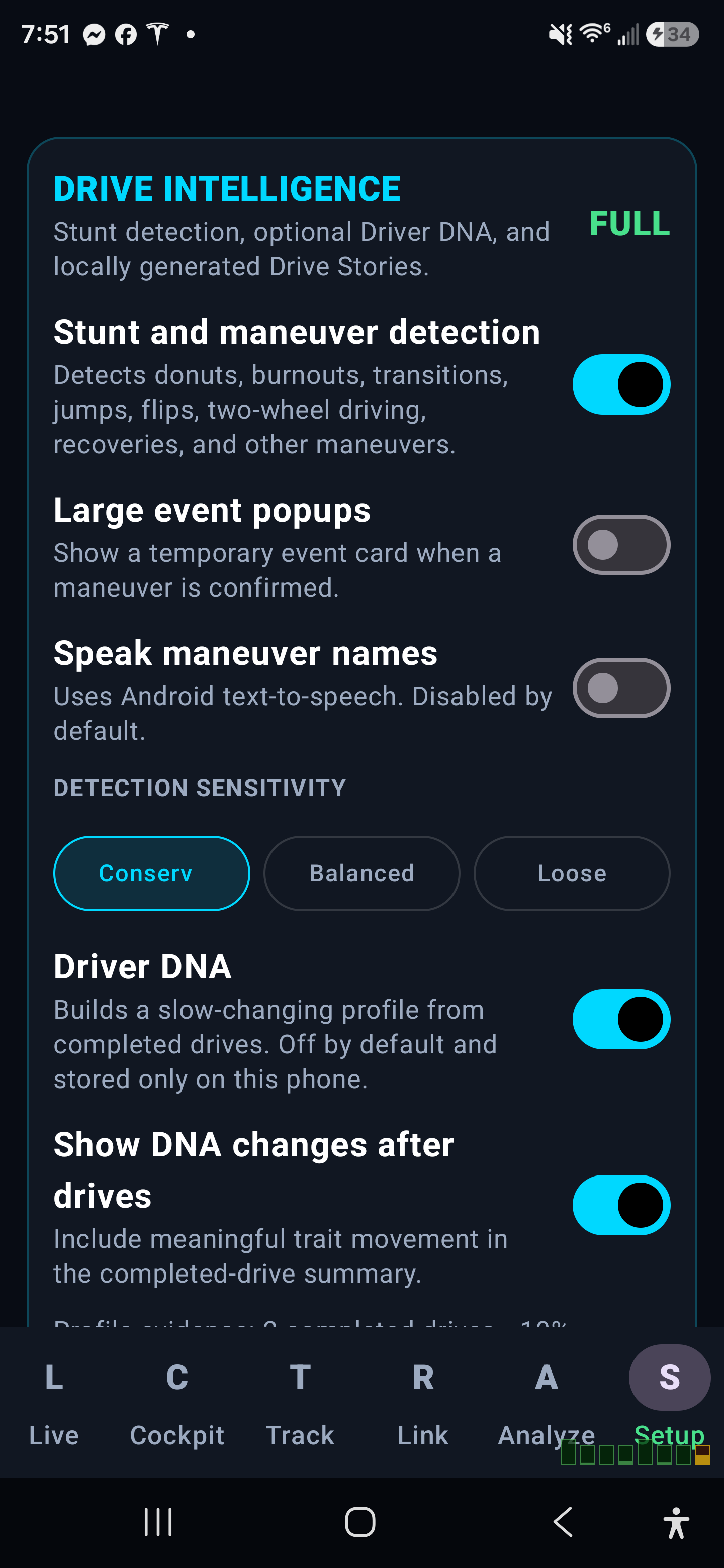
Drive Intelligence settings in DriveLab Telem 2.4.0
Drive Intelligence settings Control stunt detection, event popups, spoken announcements, Driver DNA, Drive Stories, and detection sensitivity from one place.
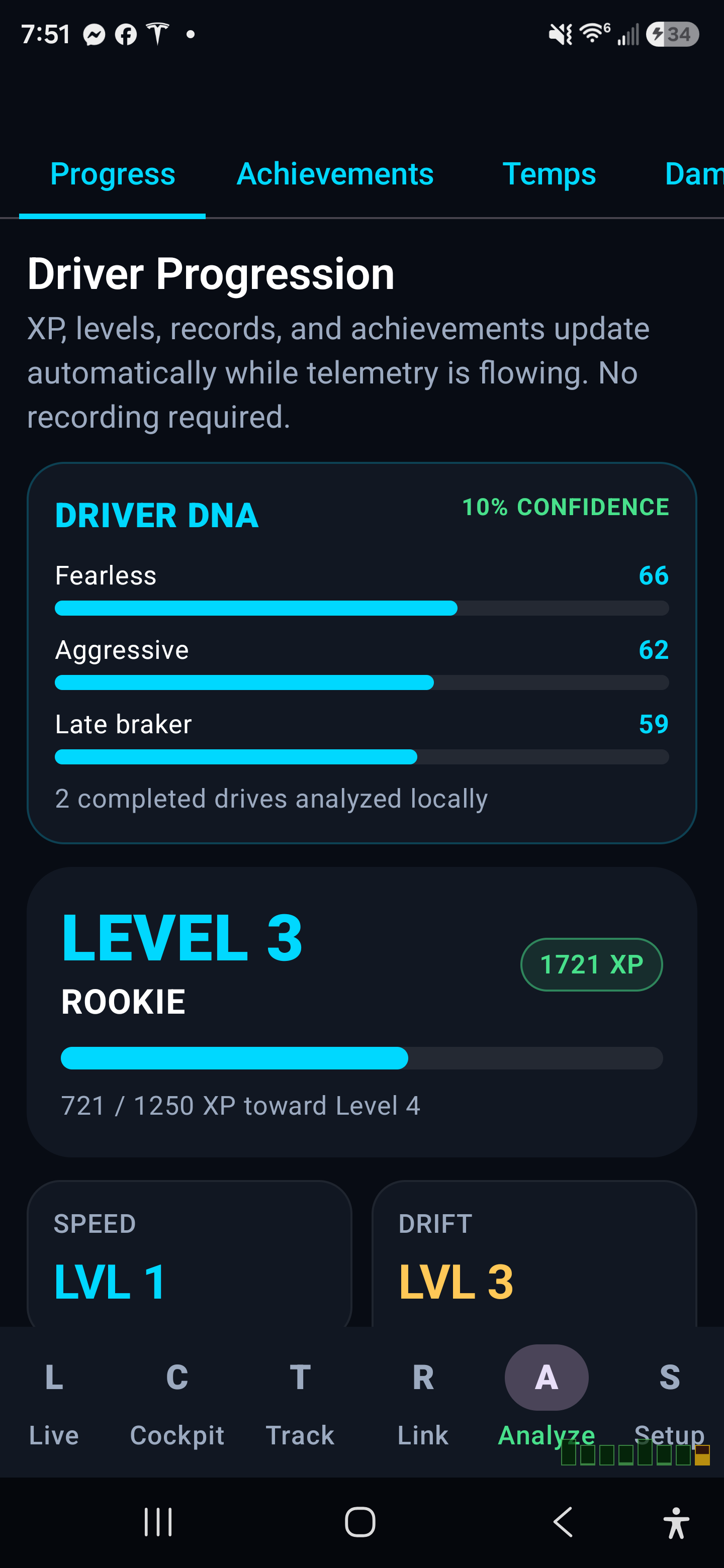
Driver DNA remains optional in DriveLab Telem 2.4.0
Driver DNA remains optional The feature stays visible but completely inactive until the driver chooses to enable it.
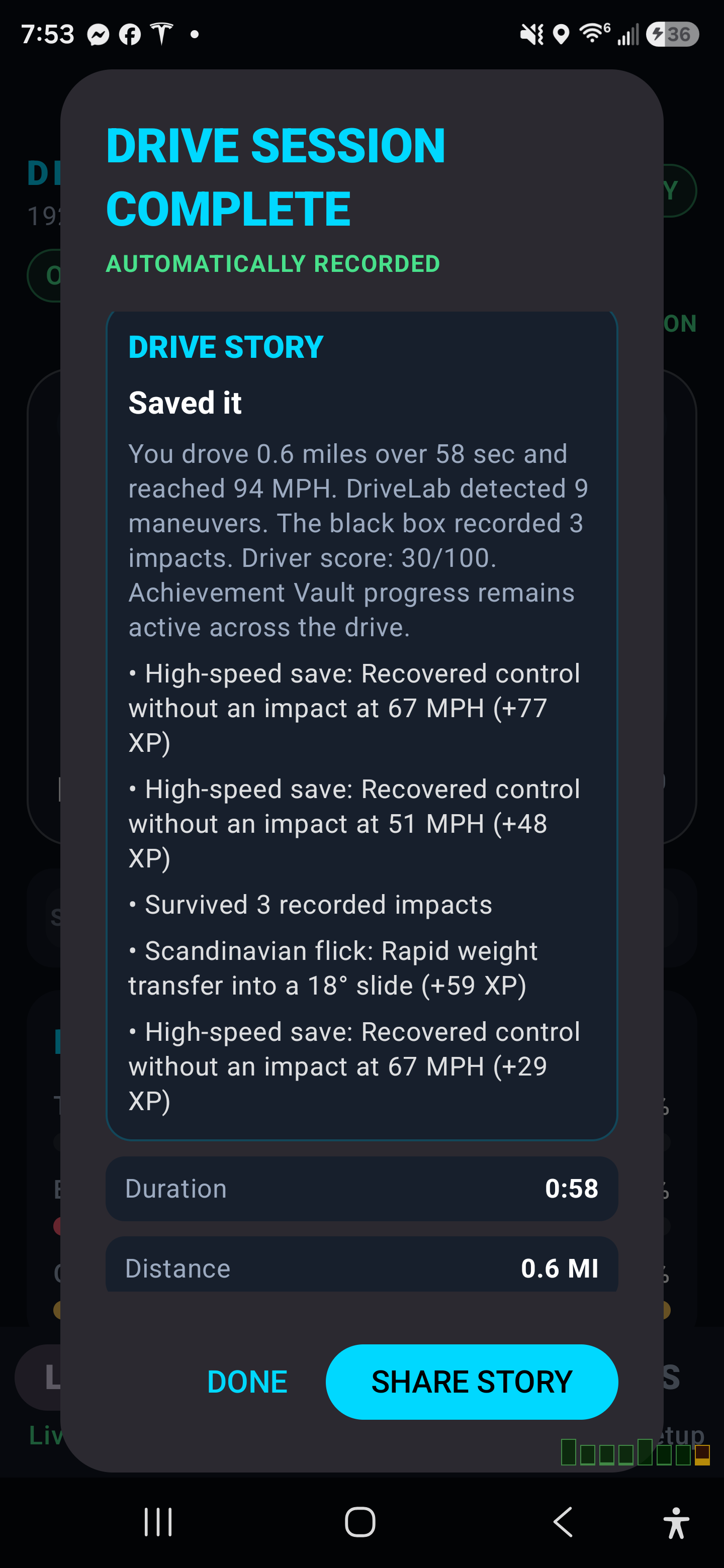
Drive Stories in saved sessions in DriveLab Telem 2.4.0
Drive Stories in saved sessions Saved sessions can include a locally generated story, major moments, detected maneuvers, and important statistics.

QUICK SETUP

Connected in a few minutes.

  1. 1

    Install the APK

    Download the signed production APK and install it on the Android phone or tablet.

  2. 2

    Use the same network

    Connect the Android device and BeamNG PC to the same local Wi-Fi or LAN.

  3. 3

    Enable OutGauge

    In BeamNG.drive, open Options → Other → Protocols and send OutGauge to the Android device IP on UDP port 4444.

  4. 4

    Enable MotionSim

    Send MotionSim to the same Android IP on UDP port 4445, then confirm both indicators in DriveLab are active.

Updating? Install the new APK directly over the current app. Do not uninstall first unless troubleshooting requires it, because uninstalling removes local app data.

FAQ

The important questions.

What is TrackLab?

TrackLab records a route from BeamNG MotionSim position data, then turns it into an automatically timed circuit or point-to-point stage. Full Edition adds unlimited run time, live delta, ghost position, sectors, and optimal-lap analysis.

What is RaceLink?

RaceLink is DriveLab Full Edition multiplayer. The host opens a private lobby first, friends join by code or invitation, and everyone can chat before a course is selected. The host saves the TrackLab setup, drivers mark Ready, and one synchronized countdown starts the race. No Discord or BeamMP integration is required.

Does it require a program on the PC?

No. DriveLab receives BeamNG.drive's built-in OutGauge and MotionSim UDP data directly over your local network.

Does Free Edition need a serial key?

No. Free Edition works immediately with basic Live telemetry, setup, settings, and signed updates.

Can I preview premium screens?

Yes. Demo Mode previews Full Edition, but Demo does not permanently save progression, sessions, or crash history.

How many devices can use a Full license?

A standard license supports up to two active Android devices unless the purchase listing states otherwise.

Is driving telemetry uploaded?

Solo telemetry remains local between the BeamNG PC and Android device. RaceLink is opt-in and sends only the temporary course, room chat, progress percentage, lap and sector status, and results needed to connect participating Full Edition phones.

How are updates protected?

The app verifies the signed manifest, APK size, SHA-256, package name, version, minimum SDK, and permanent Android signing certificate before installation.